Shyanta
What I'm most proud of
The part that I'm most proud of, is the code that gives you the results for the series game.
In this game the user gets 4 tv shows to rank from 1 to 4, four times. The user will get the 5 most related series, based on the four numbers 1.
The first tricky part was the ranking from 1 to 4. This was done in client-sided JavaScript. It had to check what number already existed, to see of what the number of the clicked item should be.
After that, to get the data of the numbers one, the code had to be written in a form, so the server could read out the formdata with bodyparser.
The second tricky part was the way so calculate the percentage of the match per tv show. The four numbers 1 give me 3 arrays with all the tags the tv shows together contain. Then it checks per tv show, if it contains any of the tags, that are given. The more tags that match, the higher the percentage will be. The 5 highest percentages will be shown and will be saved to the users account in the database. This way this data can be used on the home page, to make that more personal.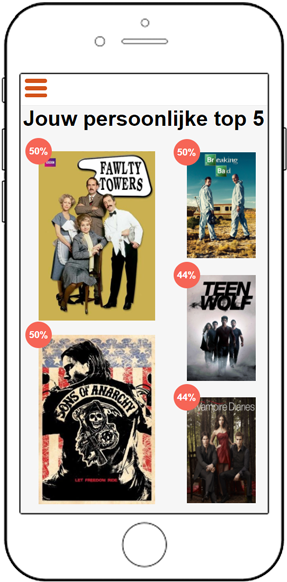
CSS to the Rescue
I used this course in the entire 'Series Game' feature. This whole featured is styled by me. It's fully responsive and works on IE9 and higher. Most parts of this feature are styled with flexbox. The reason I chose flexbox and not CSS Grid, is because I'm not familiar with Grid yet. And because of the deadline put to this project, I chose flexbox, because I do know this very well, so I could use this more easily.
The challenge with flexbox was that I was using it with images. With flexbox, the images are easily stretched out of their proportion. The layout that you see above is made with flexbox.
Also I did some stuff with keyframes and animations. Tristan set up the basis, but because of styling changes, I had to change a lot to this code. The following code is for these keyframes:
.series-game-intro #intro-1, .series-game-intro #intro-2, .series-game-intro #intro-3 {
        position: absolute;
        top: 1em;
        left: 0;
        right: 0;
        display: flex;
        flex-direction: column;
        justify-content: space-around;
        animation-duration: 20s;
        animation-timing-function: ease-in-out;
        animation-iteration-count: infinite;
    }
.series-game-intro #intro-1 {
        animation-name: anim-1;
    }
    .series-game-intro #intro-2 {
        animation-name: anim-2;
    }
    .series-game-intro #intro-3 {
        animation-name: anim-3;
    }
    @keyframes anim-1 {
        0%, 4% {
            opacity: 0;
        }
        4%, 29.33% {
            opacity: 1;
        }
        33.33%, 100% {
            opacity: 0;
        }
    }
    @keyframes anim-2 {
        0%, 33.33% {
            opacity: 0;
        }
        37.33%, 62.66% {
            opacity: 1;
        }
        66.66%, 100% {
            opacity: 0;
        }
    }
    @keyframes anim-3 {
        0%, 66.66% {
            opacity: 0;
        }
        71.66%, 96% {
            opacity: 1;
        }
        100% {
            opacity: 0;
        }

    }
In this code I created 3 different keyframes, that will make the three different sections pop up. The animation will last 20 seconds and on each third, the sections are toggled with an ease-in-ease-out.

Webapp from Scratch
The series game ranking is a part that works in clientsided javascript. With this javascript I have to check if the image is selected, but also the checkbox, because people also have to be able to tab through the page. This works with the following code: var serieChoicesInput = document.getElementsByTagName('img');
var serieChoicesInput = document.getElementsByTagName('img');

for (var i = 0; i < serieChoicesInput.length; i++) {
        // With a click on the image the ranking will be triggered
        serieChoicesInput[i].addEventListener('click', function(){
            // save this in self and send it with the function, so the this will always have the
            // same meaning
            var self = this;
            selectClickedItem(self);
        });
        // To make sure the page is tabable, put a keydown event on the checkbox, so it can be selected With
        // the spacebar
        if (serieChoicesInput[i].parentNode.querySelector('input[type="checkbox"]') !== null) {
            serieChoicesInput[i].parentNode.querySelector('input[type="checkbox"]').addEventListener('keydown', function(e){
                // save this in self and send it with the function, so the this will always have the
                // same meaning
                var self = this;
                if (e.keyCode === 32){
                    selectClickedItem(self);
                }
            })
        }
    }
In this code I'm looping through the images on the page, to add an eventlistener to those.
But because the page also has to be tabbed through, the eventlistener also has to be added to the checkbox that's above this image. The reason that this doesn't work with a second loop through the checkboxes, is because they will both be triggered, and the functions will neutralize each other, thus, nothing will happen on the page. This eventlistener will listen to the spacebar. This because the default way to select a checkbox is with the spacebar.
I save 'this' in a variable to be sure this means exactly the same everywhere. 'this' on a keydown has another meaning than on a click. And after that I'm calling the function.
    var numbersArr = ['one', 'two', 'three', 'four'];
    var nextBtn = document.getElementById('next-btn');
    nextBtn.disabled = true;

    function selectClickedItem (self) {
        console.log(self);
        // Check if there already is an active class, if so, remove it
        if (document.getElementById('active')){
            document.getElementById('active').removeAttribute('id', 'active');
        }
        // Check if it already has an ID, if so, remove it, else, set the attribute
        if ((self.parentNode.className).length > 0){
            self.parentNode.querySelector('input[type="checkbox"]').removeAttribute('name');
            self.parentNode.removeAttribute('id');
            self.parentNode.removeAttribute('class');
        } else {
            for (var i = numbersArr.length; i >= 0; i--) {
                // check if the class 'one'', 'two', 'three' or 'four' exists, if so, give it this class
                if(document.querySelector('.' + numbersArr[i]) === null){
                    self.parentNode.querySelector('input[type="checkbox"]').setAttribute('name', numbersArr[i]);
                    self.parentNode.setAttribute('id', 'active');
                    self.parentNode.setAttribute('class', numbersArr[i]);
                }
            }
        }
        // Check if the fourth class exists, if so, enable the submit button (this makes sure the user
        // ranks every tvshow before proceding)
        if (document.querySelector('.four') !== null){
            nextBtn.disabled = false;
        } else {
            nextBtn.disabled = true;
        }
    }
This function gives the clicked element and its parents some attributes. First, the element get an 'active' id, to make the image scale and it checks if it already exists, if so, it removes this id and adds it to the new clicked element.
Second, it adds a class with the number that is next. This way I can style the elements with a number. This creates some interfaces like this:
The way to get results is rendered serversided. This is why the checkboxes also have a name attribute, so I can call to that in my server.
Code for the steps:
router.get('/step/:step', function (req, res) {
    var one = [
        {   data: reviewArr.find(o => o.review.seriesName.toLowerCase() === 'fawlty towers')},
        {   data: reviewArr.find(o => o.review.seriesName.toLowerCase() === 'teen wolf')},
        {   data: reviewArr.find(o => o.review.seriesName.toLowerCase() === 'friends')},
        {   data: reviewArr.find(o => o.review.seriesName.toLowerCase() === 'game of thrones')}
    ];
    var two = [
        {   data: reviewArr.find(o => o.review.seriesName.toLowerCase() === 'doctor who')},
        {   data: reviewArr.find(o => o.review.seriesName.toLowerCase() === 'breaking bad')},
        {   data: reviewArr.find(o => o.review.seriesName.toLowerCase() === 'sons of anarchy')},
        {   data: reviewArr.find(o => o.review.seriesName.toLowerCase() === 'the bridge')}
    ];
    var three = [
        {   data: reviewArr.find(o => o.review.seriesName.toLowerCase() === 'the sopranos')},
        {   data: reviewArr.find(o => o.review.seriesName.toLowerCase() === 'planet earth')},
        {   data: reviewArr.find(o => o.review.seriesName.toLowerCase() === 'the vampire diaries')},
        {   data: reviewArr.find(o => o.review.seriesName.toLowerCase() === 'pretty little liars')}
    ];
    var four = [
        {   data: reviewArr.find(o => o.review.seriesName.toLowerCase() === 'sherlock')},
        {   data: reviewArr.find(o => o.review.seriesName.toLowerCase() === 'the walking dead')},
        {   data: reviewArr.find(o => o.review.seriesName.toLowerCase() === 'chicago fire')},
        {   data: reviewArr.find(o => o.review.seriesName.toLowerCase() === 'suits')}
    ];
    switch (req.params.step) {
        case '1':
            res.locals.stepNum = 1;
            res.locals.stepData = one;
            res.render('series-game/steps');
            break;
        case '2':
            res.locals.stepNum = 2;
            res.locals.stepData = two;
            res.render('series-game/steps');
            break;
        case '3':
            res.locals.stepNum = 3;
            res.locals.stepData = three;
            res.render('series-game/steps');
            break;
        case '4':
            res.locals.stepNum = 4;
            res.locals.stepData = four;
            res.render('series-game/steps');
            break;
    }
})
I used the :step so I could write more dry code. In this code I'm filtering the data I fetched from our mongo dataBase. Next I'm sending different data to the templates. Based on which step is set in the param, the data will change. This makes it able to load al my data in only one route.
For the post in the steps I wrote the following code:
router.post('/step/:step', function (req, res){
    hobby = hobby.concat(reviewArr.find(o => o.review.seriesName === req.body.one).review.hobby);
    mood = mood.concat(reviewArr.find(o => o.review.seriesName === req.body.one).review.mood);
    persona = persona.concat(reviewArr.find(o => o.review.seriesName === req.body.one).review.persona);

    reviewArr = reviewArr.filter(function(el) {
        return el.review.seriesName !== req.body.one;
    });

    switch (req.params.step) {
        case '1':
            res.redirect('/seriespel/step/2');
            break;
        case '2':
            res.redirect('/seriespel/step/3');
            break;
        case '3':
            res.redirect('/seriespel/step/4');
            break;
        case '4':
            res.redirect('/seriespel/overview');
            break;
    }
})
This post is triggered by pushing the 'next' button in the steps page. It fetches the element that is selected first, and add that to the other first choices. It doesn't fetch the whole object, but only the tags of the tv show. This data will be used in the overview page, where the results will be calculated.
The /overview route has the code that calculates the percentage of the match. Each function has to be executed for the hobby, mood and persona tags.
var hobbyResults = [], moodResults = [], personaResults = [], allResults = [];

var hobbyUnique = hobby.filter(function( el, pos, self){
    return self.indexOf(el) == pos;
});
var moodUnique = mood.filter(function( el, pos, self){
    return self.indexOf(el) == pos;
});
var personaUnique = persona.filter(function( el, pos, self){
    return self.indexOf(el) == pos;
});

for (var i = 0; i < reviewArr.length; i++) {
First I created empty arrays so we can fill them later. The duplicates are filtered out of the arrays created in the post above.
I opened the loop, to loop through all the items in the database.
    var hobbyArr = reviewArr[i].review.hobby;
    var moodArr = reviewArr[i].review.mood;
    var personaArr = reviewArr[i].review.persona;
    for (var j = 0; j < hobbyUnique.length; j++) {
        if (hobbyArr.includes(hobbyUnique[j])){
            hobbyResults.push(reviewArr[i]);
        }
    }
    for (var k = 0; k < moodUnique.length; k++) {
        if (moodArr.includes(moodUnique[k])){
            moodResults.push(reviewArr[i]);
        }
    }
    for (var h = 0; h < personaUnique.length; h++) {
        if (personaArr.includes(personaUnique[h])){
            personaResults.push(reviewArr[i]);
        }
    }
Second I saved the current tags per tv show in a variable. After that I looped through the filtered tags array, to check if the tv show tags, includes the tags that were chosen in the steps. If the show contains a tag, it pushes the entire object into an array.
    var hobbyLength = hobbyResults.filter(it => it.review.seriesName === reviewArr[i].review.seriesName).length;
    var moodLength = moodResults.filter(it => it.review.seriesName === reviewArr[i].review.seriesName).length;
    var personaLength = personaResults.filter(it => it.review.seriesName === reviewArr[i].review.seriesName).length;
Then I counted the duplicates in the before filled arrays. When a serie has a duplicate, it means that it has 2 matches. This can be used to create a percentage later on.
    var hobbyMatch = (hobbyLength / (reviewArr[i].review.hobby).length) * 100;
    var moodMatch = (moodLength / (reviewArr[i].review.mood).length) * 100;
    var personaMatch = (personaLength / (reviewArr[i].review.persona).length) * 100;
Here it divides the length of the matches, by the total tags a serie has, and multiply's that by 100, to get a percentage.
So lets say your serie has 4 tags in hobby, and it has 3 matches, your percentage will be 75.
    allResults.push({
        name: reviewArr[i].review.seriesName,
        data: reviewArr[i],
        hobbyMatch: hobbyMatch,
        moodMatch: moodMatch,
        personaMatch: personaMatch,
        matchAll: Math.round((hobbyMatch + moodMatch + personaMatch) / 3)
    });
    allResults.sort(function(a,b){
        if (a.matchAll > b.matchAll) {
            return -1;
        }
        else if (a.matchAll < b.matchAll) {
            return 1;
        } else {
            return 0;
        }
    })
    var bestResults = allResults.slice(0,5);
    console.log(bestResults);
All the tv shows will be pushed into a new array including the percetages per label. And a matchAll that includes the average of the other 3 percentages. This array will be sorted from the heights match to the lowest and after that the top 5 will be pushed into a new array. This array will be ready to load into the view.
User.findOneAndUpdate( {
        'user.facebook.email' : req.session.email
    }, {
        '$set' : {
            'user.profile.matches' : []
        }
    }, { upsert: false }, function(err, docs) {
        if (err) {
            return err;
        }
    });

    User.findOneAndUpdate( {
        'user.facebook.email' : req.session.email
    }, {
        '$push' : {
            'user.profile.matches' : bestResults
        }
    }, { upsert: false }, function(err, docs) {
        if (err) {
            return err;
        }
    });

    res.locals.results = bestResults;
    res.render('series-game/overview');
This code makes the connection with the database, to store the data to the user object. First the matches array will be cleared and then the matches array will be filled with the best results. This data is going to be different per user.
After that the data will be send to the view, so it can be shown on the overview page. And this data will be shown in the following way:
Browser Technologies
In consulation with our team, we decided that for our target audience, the site has to work at IE9 or higher.
Browser Technologies is used in almost every language, meaning in HTML, CSS and JavaScript.
First most of the code is written serverside, this way it will always work no matter how old the browser is.
In the HTML I made sure to use elements that are supported to IE9.
In the CSS I used a lot of flexbox and flexbox isn't supported very great in Internet Explorer. The check I wrote for that is the following:
.item {
    display: inline-block;
    float: left;
}
@supports (display: flex){
    .item {
        display: flex;
    }
}
The @supports checks if a browser supports, and if it does, it will execute the code inbetween. All the browsers that don't support flexbox, will be styled with inline-block or floats. This way the block-structure will be maintained.
In JavaScript I made sure that the selectors I used are supported. So instead of 'classList' I used 'setAttribute'. Because 'setAttribute' is supported for IE6+. Also where I could use 'getElementsByTagName', I used it. I tried to avoid the 'querySelector' as much as I could. Though the 'input[type="checkbox"]' can't be placed inside the 'TagName' selector, it has the 'querySelector'.
But 'querySelector' is supported to IE9. So for this project it isn't a disaster.
The same goes voor 'getElementsByClassName' and 'getElementById'. Selecting by Id is better supported than a classname, so with JavaScript I'm mostly using Id's, just to be sure.
Performance Matters
For the subject Performance I myself didn't add much. I cashed the pictures from the persona check in the service worker. For the feature seriesgame I didn't do much of performance, because the feature self only makes calls for the css, javascript and images. And these are already cashed. So the feature works pretty fast and nothing could be added with performance.
I tried to write as much serversided as I could, so this would be rendered fast. The javascript is written in the fastest elements that are possible, such as for loops etc.